🗂️ Planning, Memory & Sub-agents
For anything larger than a single edit, Ludus plans the work before it runs, tracks each step, and can split the job across parallel sub-agents. It also remembers your project across chats. This is what lets you hand over a multi-step task and review it as it proceeds, instead of breaking it into small prompts yourself.
The plan panel
When a request needs multiple steps, Ludus shows a proposed plan in a plan panel before it starts. You review it and choose to:
- Accept the plan and let Ludus proceed.
- Reject it.
- Revise it, then run the revised version.
The to-do checklist
Once a plan runs, a live to-do checklist tracks progress. Each step updates as Ludus completes it, so you can see what is done, what is in progress, and what is left.
Sub-agents
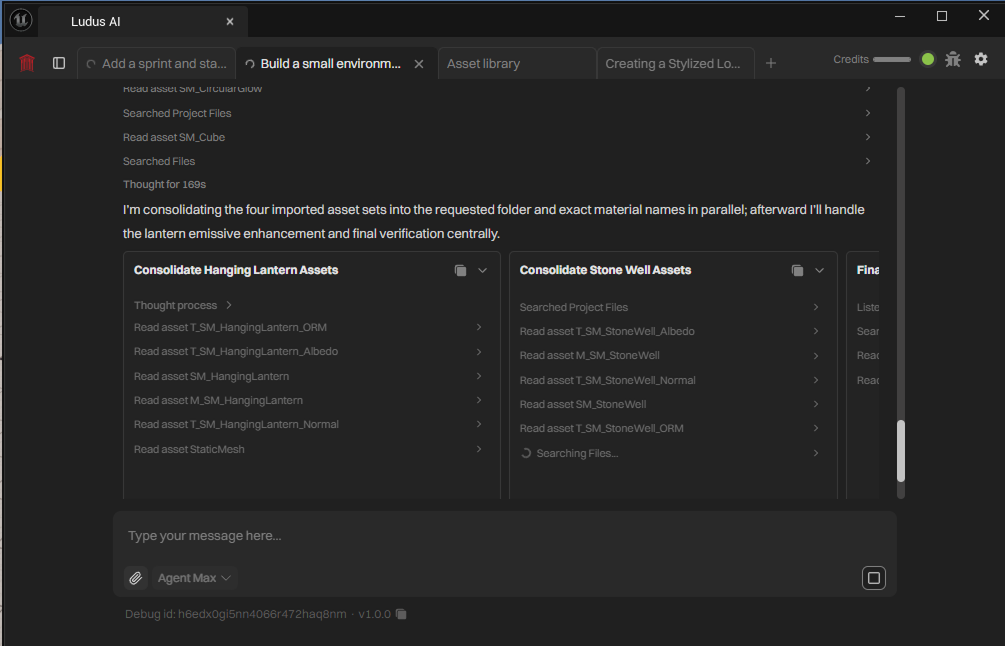
Complex tasks are split across parallel sub-agents, shown in a horizontal carousel. Each sub-agent handles part of the work at the same time as the others, and you can follow each one from the carousel.
Long-term memory
Ludus keeps long-term memory of your project, so context carries across chats. You do not have to re-explain your project every time you start a new conversation. This also means that starting a fresh chat to reset a long history does not lose what Ludus knows about the project; see Troubleshooting.
Approvals still apply
Planning does not bypass safety. Steps that modify the project still pause for your approval as they run. See Approvals & Safety. For advice on writing requests that plan well, see Effective Prompting.