🖱️ Modes
Ludus runs in three modes that differ by how much reasoning they apply, how fast they respond, and how many credits they cost per request. You select a mode from the mode selector in the plugin chat. All three modes are available on every plan and on the trial, and all three share the same project context awareness.
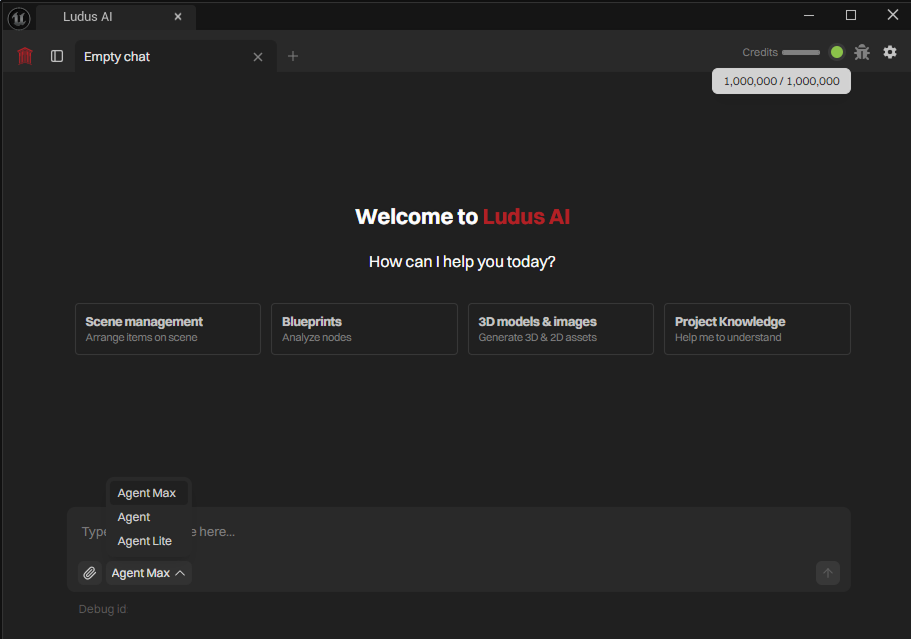
The three modes
Agent Max
The strongest mode for complex, multi-step work: large systems built across many Blueprints, deep debugging, and tasks that need the most reasoning. It takes the longest and consumes the most credits per request. Use it when the result matters more than speed.
Agent
The balanced default for everyday editing and generation. It handles most Blueprint, material, Niagara, and asset work without the cost of Agent Max. Start here unless a task is unusually large or unusually small.
Agent Lite
The fastest and cheapest mode, for quick questions, definitions, and small tasks. Use it to look up an Unreal Engine class, explain a node, or make a small edit where deep reasoning is not needed.
Choosing a mode
- Quick question or small edit: Agent Lite.
- Standard editing, generation, or debugging: Agent.
- Large multi-step build or hard bug: Agent Max.
Relative cost, lowest to highest: Agent Lite, Agent, Agent Max. Exact per-request costs are credit-based; see Credits & Costs.
Switching modes
You choose a mode when you start a chat. The mode can be changed only at the start of a new chat. Your last used mode can be remembered between sessions in settings.
Whichever mode you pick, Ludus still stages project changes for your approval. See Approvals & Safety.