🖱️ Modes
Modes Selection in the Plugin
To select one of the two available Ludus AI modes, expand the list in the bottom-left corner and choose the one best suited for your task. Modes can be changed at the start of each new chat, but you cannot switch modes in the middle of an active conversation.
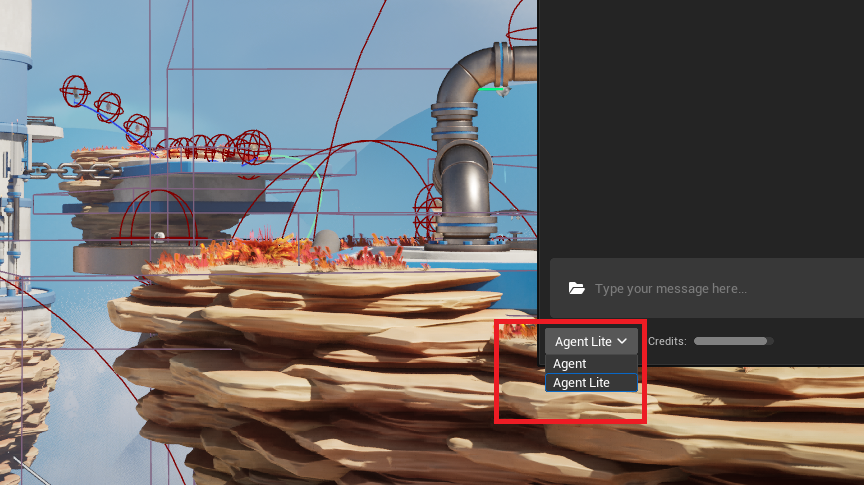
Available Modes and Information
Agent Lite
A lightweight mode designed for speed and cost-efficiency. It is faster and cheaper than Agent, making it ideal for quick queries, definitions, and explaining concepts. Both Agent Lite and Agent share the same context awareness capabilities within the plugin. Available on the Web App, MCP, and Plugin for all subscribers.
Note: 3D model generation and Blueprint Analysis require Indie or higher. Blueprint Generation requires Pro or Enterprise. For complex C++ tasks, we recommend using Agent or MCP for best results.
Agent
Our advanced agent, built for complex tasks directly within Unreal Engine. It takes more time to process but delivers superior results for complex, multi-step tasks and in-depth problem solving. Both Agent and Agent Lite share the same context awareness capabilities. Use cases include complex Blueprint Generation and Editing, advanced troubleshooting, 3D model generation, and in-depth development guidance including C++ code. Available to paying subscribers (Indie, Pro, Enterprise) and Trial users across the Web App, MCP, and Plugin.
Choosing the Right Mode for Your Task
Here are practical examples of when to use each mode:
Agent Lite (Faster, Cheaper)
- Pasting code snippets to understand what specific Unreal Engine classes or data types do.
- Quick lookups and definitions.
- General questions about Unreal Engine.
- Blueprint Generation and Analysis for straightforward tasks.
- 3D model generation for quick prototyping.
Agent (Better for Complex Tasks)
- Complex Blueprint Generation and Editing requiring multi-step reasoning.
- Asking how a specific subsystem works with deep context.
- Inquiring about the purpose and usage of a specific class.
- Seeking implementation guides (e.g., "How can I achieve X and Y?").
- Tasks requiring deep integration and context from your current Unreal Engine project.
- C++ code assistance and complex debugging.